Attest the human origin of your text
An AI detector reads a finished text and guesses, often wrongly. Extypis records where every character comes from while you write and gives you a signed certificate, which a publisher or a jury checks by scanning its QR code.
She closed the notebook and waited for the rain to stop. Far off, the bells of Saint-Malo were striking noon. She thought of her brother, gone three winters now, and of the letter he had never sent. The harbour smelled of salt and tar.
Text origin
Why no detector can judge a finished text
An AI detector receives a finished text and computes how closely it resembles what a model would produce. It has nothing else to read, because a text keeps no trace of how it was written, so the detector can only estimate.
Published figures show it. In 2023, a Stanford team gave seven detectors essays written by students whose first language is not English: on average, 61% of them were classified as written by AI, and 89 essays out of 91 were flagged by at least one detector. The same year, OpenAI withdrew its own detector, which recognised only 26% of AI-written texts and wrongly flagged 9% of texts written by people.
The error runs the other way too: a generated text reworded by another tool becomes much harder to spot, and a text retyped by hand carries no trace of where it came from. A tool that judges the result therefore accuses honest authors while it lets through those who take a little trouble.
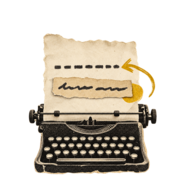
What Extypis records while you write
Since a finished text says nothing about its history, Extypis records that history as it happens. In every project, the editor notes the origin of each insertion at the moment it happens, and the server timestamps the work as it arrives.
You keep every gesture. You can paste a quotation, import an old chapter or accept a suggestion from Extypis' AI: each passage keeps the origin it had, and the certificate counts it. A tool that blocked pasting would push people to work around it, whereas a faithful record leaves nothing to work around.
The certificate states facts and passes no judgement on the author. It says how many characters were typed in Extypis, how many came from elsewhere and from where, how much time the server saw go by, and it also says what it cannot know.
This recording is silent and changes nothing on screen. Text you did not type is only highlighted if you ask for it in the arrow menu: if you write with AI on purpose, you see no difference.
Writing with an AI while getting around our checkpoints is far more work than writing yourself. The generated text has to be retyped by hand, at a real typing rhythm, for hours the server counts one by one.
What Extypis records while you write
Every character inserted into the text gets an origin. Text that arrives with no known origin is counted as unexplained, so it is up to the text to show where it came from.
- Typed in Extypis
- characters entered on the keyboard in the editor, including the corrections and replacements you make yourself.
- Typed at a steady rhythm
- characters typed during a session whose rhythm is too mechanical for a hand: near-constant intervals, no deletion, no going back over a long stretch. They are counted separately, and that session's time leaves the attested time.
- Pasted
- text pasted or dropped into the editor from ChatGPT, a web page, another part of Extypis or a source with no recognisable formatting, with the application it came from when it can be recognised.
- Retyped from a paste
- a passage typed on the keyboard that reproduces at least seven words of a text pasted earlier in the same scene, even if that text was deleted in between.
- External draft
- a passage pasted from a word processor (Word, Google Docs, LibreOffice, Pages or Notes), which you had written elsewhere before bringing it in. It is counted separately from pastes, with its application.
- Written by Extypis' AI
- the text of a suggestion or rewrite you accepted. The AI stays available, and what it writes is marked as such.
- Imported
- the content of an imported file, a template or a snippet inserted by a command.
- Moved from another scene
- a passage cut from one scene and pasted into another. Within a single scene, a moved passage keeps the origin it had.
- Before tracking
- text already there when tracking began. For an imported .docx file, the editor also shows what the file declares about itself, such as its editing time and number of revisions.
- Unexplained
- text that appeared through none of these routes, for example a change made outside the editor. It is counted separately and flagged.

If you turn it on, a coloured ink underlines everything you did not type in the editor, and hovering over it shows where the passage came from.
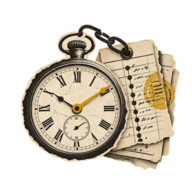
How the server attests your writing time
Every ten seconds, the editor sends the server the batch of changes made since the previous one. The server records the time it receives it, by its own clock, and chains it to the batch before through a fingerprint: a batch can no longer be removed, inserted or moved afterwards without breaking the chain.
A batch cannot cover more time than the server saw go by since the previous one. Typing a chapter offline and sending it all at once therefore does not manufacture hours of writing, and the certificate keeps the time attested by the server apart from the time written offline, which only your device timestamped.
Sessions come from these arrival times: a break of more than twenty minutes starts a new session.
The server also reads the rhythm of each session: intervals between keystrokes, deletions, pauses after a sentence, going back. A session whose rhythm is too regular for a hand leaves the attested time, and its characters appear as “typed at a steady rhythm”, with no further comment. The exact criteria are not published, because a published criterion would be worked around.
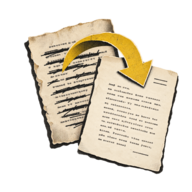
The replay: the server redoes the calculation without trusting the browser
The certificate is computed on the server, from what it received. Every night, and each time you ask for a certificate, the server replays a scene's whole journal from its first keystroke, recomputes the origin of every character and checks that each batch gives back the text it announced. A browser modified to declare itself innocent gains nothing, since its own marks are ignored.
The server then compares the result with the scene's saved text. Words the journal cannot account for are counted and appear in the certificate under “Discrepancies found”, together with inconsistent batches and keystrokes that could not be replayed.
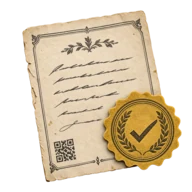
What the certificate contains
From the arrow menu next to the AI button at the top of the editor, you download the certificate of the whole book or of the chapters you choose. It is a PDF of a few pages:
- The summary
- the title, the author, the certificate's identifier, the text's fingerprint, the verification QR code, the attested writing time, sessions, writing days, characters of the final text, keystrokes and deleted characters.
- Origin of the final text
- each category with its number of characters and its share, including those at zero, and the applications pastes came from.
- Time and calendar
- attested time and offline time, the median and the longest session, characters typed per day, per hour and per day of the week.
- Rhythm
- typing speed, the median interval between two keystrokes and the share of time spent in thinking pauses. These are descriptive figures, with no grade and no threshold.
- Rewriting
- the number of characters deleted for each character of the final text, and the length of the text day after day, where cuts show.
- Details
- a table per chapter, the list of passages from elsewhere with their size and chapter, and the discrepancies found.
The certificate never contains the text, an excerpt or the content of pasted passages, so it can be shared without revealing anything of the manuscript.
The figures are computed once, when the certificate is issued, then signed. The PDF only lays them out, and the signed document is attached to it as certificate.json.
How can a publisher or a jury check the certificate?
A PDF is easy to edit, so the certificate points back to the server. Its QR code opens a verification page through a secret link: search engines do not index that page, and only the link opens it.
The page shows what the server recorded, so a figure edited in the PDF shows up at the first comparison. It also lets the publisher paste the manuscript they received, or drop its .txt or .docx file: the fingerprint is computed in their browser, the text never leaves their machine, and the page says whether it is exactly the certified text.
The signature can be checked without trusting the page. Extypis signs each certificate with an Ed25519 key whose public half is published, and a button on the page redoes the check in the browser.
If you regret sending a link, you regenerate it from the editor and the old one stops working at once. A certificate covers one exact version of the text, and a changed comma gives another fingerprint, so you issue a new one for each submission. As long as neither the text nor the figures have moved, Extypis gives you the same one back.
What the certificate cannot know
Every certificate states what it attests and what it cannot see, because a record that claimed to know everything would stop being reliable:
- Ideas
- a text retyped by hand from another screen counts as typed. The certificate attests typing, and it does not say where ideas come from.
- What happened before a paste
- a passage written by AI, pasted into Word and then into Extypis, appears as an external draft from Word.
- Offline time
- it is counted separately, because only your device timestamped it.
- Later versions
- the certificate describes one precise version. A manuscript changed afterwards no longer matches its fingerprint.
- Scenes not tracked yet
- a scene that has not been edited since tracking began has no journal yet: its text is counted separately.
Showing the certificate to your readers
If you publish on Extypis, you can show the certificate under the title of each chapter. The “Typed in Extypis” label appears when at least 95% of the text was typed in the editor; below that threshold, the line shows the typed share and the attested writing time, and one click opens the figures.
You can also open the replay: from the same line, readers watch the chapter being written, sped up, deletions and removed text included, up to the published version. Extypis warns you before you open it, and you can close it at any time: it disappears for readers at once.
Frequently asked questions
Does the certificate prove a text was written by a human?
It attests how the text entered Extypis (typed, pasted, written by Extypis' AI or imported) and how much time the server saw go by. A person can retype by hand a text that came from elsewhere, and the certificate says so in plain words. It gives verifiable facts, which each reader interprets.
Can I paste text?
Yes. Pasting is still possible, and the passage is marked with the application it came from. A pasted quotation appears in the certificate as what it is.
Do I need to switch off Extypis' AI to get a certificate?
No. It stays available, and everything it writes is marked and counted. To see no AI at all, AI-free mode removes it from the whole interface.
Who sees my figures?
You, in the editor. The people you give a certificate's link or QR code to see that certificate, and your readers see the line under a published chapter's title if you chose to show it. The text appears in no certificate.
What happens to a certificate if I delete the work or my account?
Links already sent show that the certificate was withdrawn, with its identifier and date. The title, the name and the figures disappear.
Start writing
Create a project and write as usual. You download the certificate from the arrow menu next to the AI button at the top of the editor.