Atticus or Extypis: which is better for writing and formatting your book?
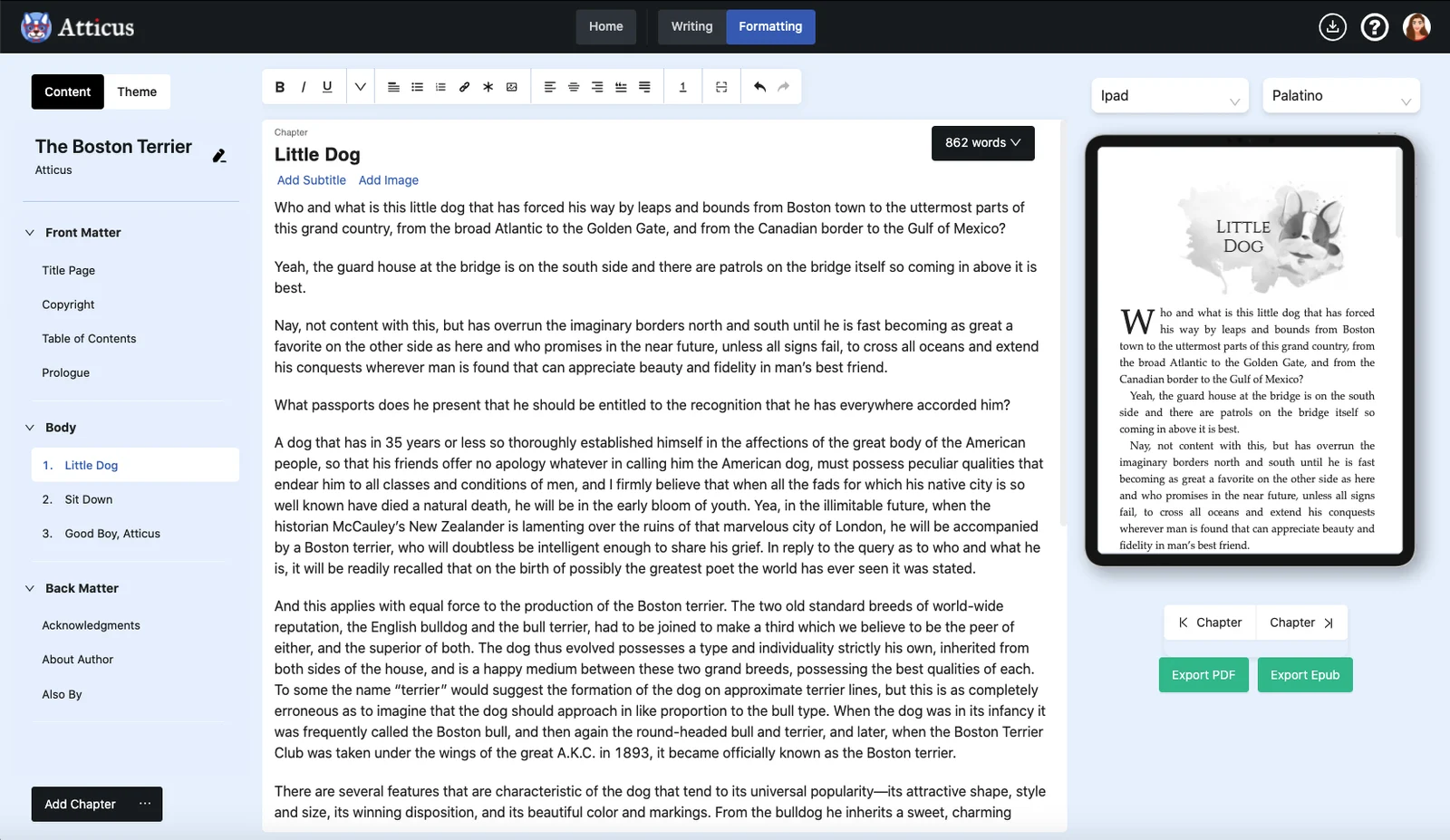
Atticus is first a formatting tool for self-publishing, paid once, which opens in the browser; Extypis is a writing workshop, with a free account, then paid monthly. Here is how each one answers the questions people ask before choosing, what its users say about it, and the rounds Atticus wins are on the board.

How this page was made
Every line about Atticus was read on 17 October 2026 on atticus.io, its checkout page and its help center, and, for what its help does not say, in the Kindlepreneur review, written by its co-founder. Its prices are shown there in US dollars. User reviews come from Trustpilot, an authors' forum and published reviews, each with its link. Extypis prices and limits are read live from our pricing page. Atticus has neither a free version nor a trial: on the free side, Atticus's column says what you get without paying, which is nothing.
Atticus in figures
Atticus does not publish its number of users. Its counts of themes and fonts are its own.
$147
the price of Atticus, paid once, updates included, refundable within 30 days
0 days
of trial: Atticus has neither a free version nor a trial period
4.4 out of 5
its rating on Trustpilot, from 200 reviews, 99 of them left in the last 12 months
17 themes
of layout, and more than 1,500 fonts, according to its home page
1 device
at a time: to move to another, you log out of the first
English
only for the interface, and for the hyphenation and chapter numbering rules
What matters to you
Take out what does not concern you: the board and the score keep only your criteria.
Rounds won
16 for Extypis, 0 for Atticus. 0 draws, which do not count in the score.
Free: the free Extypis account (1 project, at most 15,000 words per project, 2 exports per month) against Atticus, which has neither a free version nor a trial, but refunds within 30 days.
What do I pay?
How much do I pay, and for how long?
Better answerExtypis
You pay nothing, with no time limit, with 1 project and at most 15,000 words per projectAtticus
Nothing is free: no free version and no trial, but a refund within 30 days, no questions askedHow many books can I write, and how long?
Better answerExtypis
You get 1 project, and a project holds up to 15,000 words in 10 sheetsAtticus
None without paying
How do I write and organise my book?
While I write, do I see the pages of my book?
Better answerExtypis
Yes, on a computer: you write in the pages, at the size, margins and font of your PDFAtticus
Nothing without payingCan I see my whole story scene by scene, and reorder it?
Better answerExtypis
Yes, up to 10 sheets per project: each scene is a card with its summary, and moving the card moves the textAtticus
Nothing without payingCan I keep sheets for characters, places and objects?
Better answerExtypis
Yes: characters, places, objects, events and your own categories, and each name is found everywhere in the text, nicknames includedAtticus
Nothing without payingCan I see the relationships between my characters and the timeline of the story?
Better answerExtypis
Yes: a map shows the links you write between sheets, and a timeline places each event at its date in the storyAtticus
Nothing without payingCan I go back to an earlier version of my text?
Better answerExtypis
Yes: you freeze a version of each sheet, compare two versions side by side and restore the one you wantAtticus
Nothing without paying
And AI?
Can I write with no AI at all?
Better answerExtypis
Yes: one setting removes every AI tool from the screen; only importing a manuscript still goes through an AIAtticus
Nothing without payingIf I want AI, do I get any?
Better answerExtypis
Yes: 300 credits, given onceAtticus
No: Atticus offers none
Where and when can I write?
Which languages is the interface in?
Better answerExtypis
In French, English, Spanish, German and ChineseAtticus
In English only, and chapter numbering, hyphenation and drop caps follow English rules
How do I get, print and share my book?
Where do I write the dedication, the preface and the copyright page?
Better answerExtypis
On a computer, you write them on the pages of the book, in their place, and you type the publisher and the ISBN on the copyright pageAtticus
Nothing without payingDo I get a PDF ready for the printer?
Better answerExtypis
Yes: Extypis typesets the PDF with LaTeX, in A4, A5 or Letter, up to 2 exports per monthAtticus
Nothing without payingCan I get an EPUB for an e-reader?
Better answerExtypis
Yes, up to 2 exports per monthAtticus
Nothing without payingCan I publish my book in the app, so people read it online and send comments?
Better answerExtypis
Yes: the book has its reading page, open to everyone, and readers with an account comment paragraph by paragraphAtticus
Nothing without payingCan I show that I wrote my text myself?
Better answerExtypis
Yes, for the typing: the “human origin” certificate says what was typed, pasted or moved, and is shared by a link; it does not say where the ideas come fromAtticus
Nothing without payingCan I bring in a manuscript started elsewhere?
Better answerExtypis
Yes: Word, PDF, EPUB, Markdown or HTML, as long as the manuscript fits in 15,000 wordsAtticus
Nothing without paying
What its users like about Atticus
A summary of what comes back in published reviews, each with its link. We paraphrase rather than quote.
It is paid once, $147, updates included, and runs on Windows, Linux and Chromebook as on Mac; testers set it against Vellum, $249 and Mac only.
Indie Author Magazine, April 2022 · publishing.co.uk review, October 2026 · 5 star reviews on Trustpilot
It lays out a book fast: templates and saved page types make a book in under an hour, a 346-page novel in under 30 minutes for one author.
Its support is human and quick, sometimes the same day or on a weekend, even for a problem at a bookseller: it is the praise that comes back most.
Its files go through at booksellers: several independent publishers say they have had no rejection, across dozens of books and box sets.
It improves often, say long-time users, one of whom has laid out more than 160 books in five years.
What bothers its users, and how Extypis answers
The complaints that come back, from the most frequent to the rarest. Opposite each one, what Extypis does, including when it does no better.
The complaint
Lost work: whole chapters disappear, the order of chapters is not saved, saving online fails; one user advises exporting after every session.
1 to 3 star reviews on Trustpilot · Christian Writers forum, October 2025
Extypis's answer
The text is saved continuously, with a local copy in case of a dropout. A deletion waits 30 days in the trash, and each sheet keeps the versions you freeze.
The complaint
Slowness, freezes and sync errors: a blank login screen, a jumping cursor, and a lag that grows with the number of pages.
Extypis's answer
Saving happens in the background, without interrupting typing, and your account opens on several devices without logging out of the first.
The complaint
Images and complex layouts resist: moving an image is laborious, there is no table, and indents and quotations are awkward.
1 to 3 star reviews on Trustpilot · publishing.co.uk review, October 2026 · selfpublishing.com review, March 2022
Extypis's answer
The editor inserts tables, and images that you resize by their corners, with a caption and the text wrapping around them.
The complaint
Import and paste are fragile: an imported Word file introduces mistakes or skips chapters, and Atticus itself advises against pasting text from elsewhere.
1 to 3 star reviews on Trustpilot · Christian Writers forum, October 2025
Extypis's answer
Extypis imports Word, PDF, EPUB, Markdown and HTML, and splits the book into parts, chapters and scenes. The split should be checked: it can get a heading wrong.
The complaint
PDFs that cause problems at print: margins refused by the printer, text that cannot be selected, badly embedded fonts, and a format that is not PDF/X-1a.
1 to 3 star reviews on Trustpilot · publishing.co.uk review, October 2026
Extypis's answer
The PDF is typeset by LaTeX, with its fonts embedded and text you can select. It is not certified PDF/X-1a either, and the size remains A4, A5 or Letter.
The complaint
Neither version history nor planning tools: it is impossible to go back to an earlier draft, and the outline, characters and plot are announced as “in development”.
Atticus, home page · Kindlepreneur review, September 2026 · Indie Author Magazine, April 2022
Extypis's answer
Each sheet's versions, revision mode, sheets, narrative outline, scene board and timeline are in the free account.
The complaint
A beta reader has to buy their own licence to comment, and live co-writing is not documented.
Help: why editors and beta readers need to buy Atticus · Reedsy: Studio, Atticus and Scrivener compared
Extypis's answer
Your readers comment on the published book with a free account. Extypis has no editor role with track changes, however.
The complaint
Everything is in English, the interface as well as the hyphenation rules, and no book size can be set to measure.
Help: the interface language · Help: custom trim sizes · publishing.co.uk review, October 2026
Extypis's answer
The interface exists in French, English, Spanish, German and Chinese. The PDF size, for its part, is limited to A4, A5 and Letter.
What Atticus does better
- It is paid once, $147, updates included. Extypis is paid monthly.
- It lays out the printed book and the ebook with 17 themes, more than 1,500 fonts and book sizes marked according to whether Amazon KDP or IngramSpark accept them. Extypis offers A4, A5 and Letter.
- It shows the EPUB on an iPhone, an iPad, a Kindle or a Kobo before export.
- It lets a co-author, an editor with track changes and beta readers work together, each in their role.
- Its front and back matter pages are ready to fill in, down to the biography and the “also by this author” page.
What Extypis does that Atticus does not
- It can be tried for free, with no time limit, while Atticus asks $147 before the first line.
- You write in the pages of the book, at the size, margins and font of your PDF.
- It prepares the story: character sheets found in the text by name or nickname, relationship map, timeline, scene board.
- It keeps the versions of each sheet, to compare and restore.
- Its interface exists in five languages, and your account opens on several devices at once.
- It publishes your book on a reading page where your readers comment, and issues a “human origin” certificate that says what was typed, pasted or moved.
Writing in Extypis, formatting in Atticus
The two complement each other for anyone who wants a very fine self-publishing layout: write and plan the story in Extypis, export the manuscript to Word, then import that file into Atticus, which recommends the Word format. The other way round, Atticus exports to Word and EPUB, which Extypis imports, splitting it into chapters and scenes, with the sheets of the characters who come back often. The free Extypis account imports a manuscript as long as it fits in 15,000 words.
The questions people ask us
- Is Atticus free?
- No. Atticus has neither a free version nor a trial: it costs $147 once, updates included, and its publisher refunds within 30 days, no questions asked (surveyed on 17 October 2026).
- Is Atticus available in French?
- No. Its help says the interface is in English only, that automatic chapter numbering, hyphenation and drop cap punctuation follow English rules, and that no date is set for other languages. The Extypis interface exists in French, English, Spanish, German and Chinese.
- Does Atticus work offline?
- In part: once logged in and the app open, you keep writing without a network, and the text syncs when the connection returns; importing, exporting and logging in need the internet. Extypis also keeps the text of a tab that is already open until the network comes back.
- What is the difference with Extypis?
- Atticus is mostly for formatting a book for self-publishing, and is paid once, $147. Extypis is for writing and planning the story, with sheets, relationship map, timeline and scene board, has you write in the pages of the book and typesets the PDF; it is free up to 15,000 words per project, then costs 9 € per month.
- Does Atticus have AI?
- No, and its help says there are no plans to add any. A copyright page template even adds a “written by a human author” line. Extypis offers AI on request, one setting removes it from the screen, and its “human origin” certificate says what was typed, pasted or moved.
- Can you write in Extypis and format in Atticus?
- Yes: export the manuscript to Word from Extypis, then import it into Atticus, which recommends that format. The reverse works too, through a Word or EPUB export from Atticus imported into Extypis.
Sources
The pages opened on 17 October 2026 to write each line about Atticus.
- Atticus, home page
- Atticus, checkout page
- Help: is there a free trial?
- Help: refunds
- Help: when does my licence expire?
- Help: browser or download?
- Help: Atticus on iPad
- Help: using Atticus offline
- Help: formatting with Atticus
- Help: custom trim sizes
- Help: front and back matter
- Atticus, collaboration roles
- Help: why editors and beta readers need to buy Atticus
- Help: writing goals
- Help: does Atticus have AI?
- Help: the “human-written” template
- Help: the interface language
- Help: importing an EPUB
- Help: importing a PDF
- Kindlepreneur review, September 2026
User reviews
- Indie Author Magazine, April 2022
- publishing.co.uk review, October 2026
- 5 star reviews on Trustpilot
- Reviews on Trustpilot
- 1 to 3 star reviews on Trustpilot
- Christian Writers forum, October 2025
- selfpublishing.com review, March 2022
- Atticus, home page
- Kindlepreneur review, September 2026
- Help: why editors and beta readers need to buy Atticus
- Reedsy: Studio, Atticus and Scrivener compared
- Help: the interface language
- Help: custom trim sizes
2026-10-17
See also Extypis compared to Reedsy Studio · Extypis compared to Scrivener · Extypis compared to Microsoft Word · Extypis for writing a novel · The Extypis pricing grid
Extypis compared to other writing software
The same survey, tool by tool, with what each one does better.
 Extypis vs ScrivenerThe reference, installed and paid once
 Extypis vs Microsoft WordThe word processor publishers expect
 Extypis vs Google DocsGoogle's free word processor
 Extypis vs UlyssesThe Markdown app for Apple devices
 Extypis vs Reedsy StudioThe free online editor that typesets your book
 Extypis vs SudowriteWriting software built around AI
 Extypis vs yWriterFree for Windows, organised in scenes
 Extypis vs ManuskriptThe open-source tool inspired by Scrivener
 Extypis vs bibiscoFree, built around characters
 Extypis vs WriteControlThe French online writing app
The writing studio novelists were missing
Outline, characters, places and objects, the links between them, mind map, scene board, export: everything lives in one place. Plus an AI that knows your story, whenever you want one.
Free to write and to export. No credit card asked.
76 features. Just enough.
Ready to write?
Free signup, no credit card.
Everything our writing app puts in your hands
Five areas, from the first outline to the file ready to send: everything you ask of a writing app. Here is what each one covers.
Hold your story, from outline to final page.
Narrative tools you won't find elsewhere — turn a tangle of ideas into a structure that holds.
An AI that suggests, you decide
The AI permanently sees your whole project — outline, sheets, scenes already written. Every rewrite, every completion, every suggestion, every cover stays consistent with your entire work, and at no extra cost or setup. You approve every word.
Estimates if you only use this feature. Credits are shared across every AI tool.
Daily writing comfort
Everything that makes long-form writing sustainable: shortcuts, templates, anchored notes, versions, goals.
Analyse and refine your prose
Style tools that go beyond the spell-checker: readability, poetic meter, repetitions, connectors, passive voice.
What you write is what you export.
Your text is laid out as you type, in the format of your PDF. All that is left is to pick the file format, or to publish on Extypis.