Ulysses or Extypis: which is better for writing your novel?
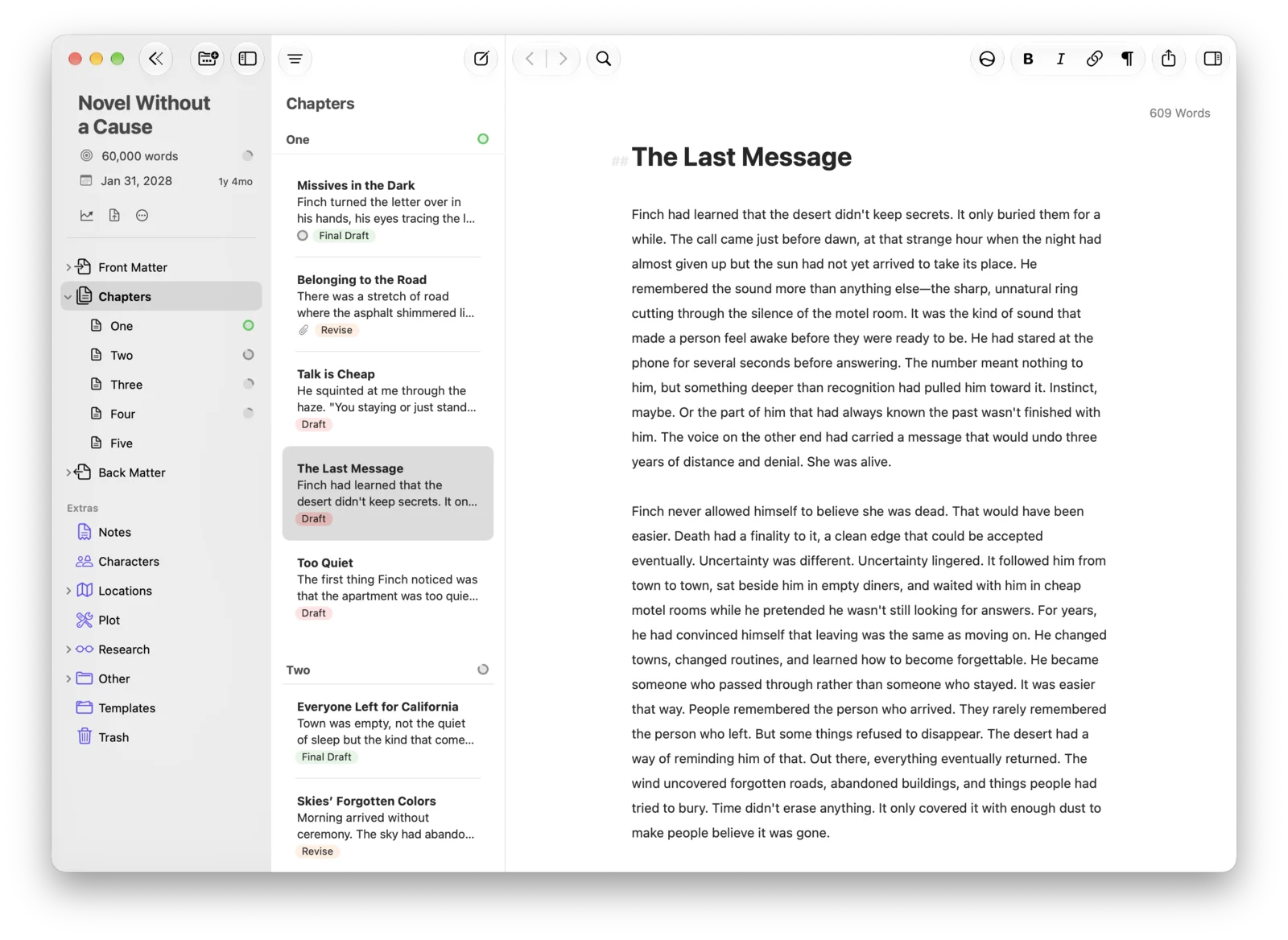
Ulysses is a writing app for Mac, iPad and iPhone, with Markdown text, which is rented by the year; Extypis opens in the browser of any device, with a free account, then is paid monthly. Here is how each one answers the questions people ask before choosing, what its users say about it, and the rounds Ulysses wins are on the board.

How this page was made
Every line about Ulysses was read on 17 October 2026 on ulysses.app, its site, in its help center, its release notes and its App Store listings, in euros on the French store. User reviews come from the latest 500 written reviews on the US, French, German and UK App Stores, and from a published review, each with its link; these reviews come mostly from people who downloaded the app. Extypis prices and limits are read live from our pricing page. Ulysses has no free version: on the free side, it is compared through its 7-day trial; on the paid side, through its annual subscription.
Ulysses in figures
The ratings come from Apple's stores, the only ones to publish reviews in number on Ulysses.
€39.99 per year
the annual subscription on the French App Store, or €5.99 per month, which comes to €71.88 over a year
€199.99
the lifetime licence sold in the App Store, with no trial, with the updates of the current app
4.7 out of 5
its rating on the US Mac App Store, from about 10,000 ratings
4.5 out of 5
its rating on the French App Store, from 206 ratings
7 days
of trial; without a subscription, the app can only be used to read
2003
the year of its first version, designed in Leipzig, where its publisher is still based
What matters to you
Take out what does not concern you: the board and the score keep only your criteria.
Rounds won
11 for Extypis, 1 for Ulysses. 8 draws, which do not count in the score.
Free: the free Extypis account (1 project, at most 15,000 words per project, 2 exports per month) against Ulysses's trial, complete but limited to 7 days, on Mac, iPad or iPhone.
What do I pay?
How much do I pay, and for how long?
Better answerExtypis
You pay nothing, with no time limit, with 1 project and at most 15,000 words per projectUlysses
Nothing for the 7-day trial, then the app can only be used to readHow many books can I write, and how long?
Better answerExtypis
You get 1 project, and a project holds up to 15,000 words in 10 sheetsUlysses
As many as you like, during the 7 days of the trialAnd if I write on a Mac, a PC, a tablet and a phone?
Better answerExtypis
The free account opens in the browser of each device, Windows and Android includedUlysses
On Mac, iPad and iPhone only, synced through iCloud; nothing on Windows, Android or the web
How do I write and organise my novel?
While I write, do I see the pages of my book?
Better answerExtypis
Yes, on a computer: you write in the pages, at the size, margins and font of your PDFUlysses
No: you write in Markdown, and the layout comes from the style chosen at export, with a preview in the export windowCan I see my whole story scene by scene, and reorder it?
Extypis
Yes, up to 10 sheets per project: each scene is a card with its summary, and moving the card moves the textUlysses
Yes, as a list: nested groups and sheets are reordered by dragging them, split and merged, with no board of cardsCan I keep sheets for characters, places and objects?
Better answerExtypis
Yes: characters, places, objects, events and your own categories, with their fields, images and documentsUlysses
As text sheets: you keep your notes in a “Characters” group, with no fields and no profilesIf I name a character, even by a nickname, does the app find them?
Better answerExtypis
Yes, everywhere in the book, as soon as the nickname is on their sheet; a tab suggests the names in the text that have no sheet yetUlysses
No: you add a keyword by hand to each sheet where the character appearsCan I see the relationships between my characters and the timeline of the story?
Better answerExtypis
Yes: a map shows the links you write between sheets, and a timeline places each event at its date in the storyUlysses
No: its help describes neither a relationship map nor a timeline of the storyDoes the app track my writing goals?
Extypis
Yes: a goal in words, characters or reading time, at most, at least or about, with a deadlineUlysses
Yes: per sheet, per group or per project, in words, pages or reading time, and a deadline calculates each day's shareCan I go back to an earlier version of my text?
Extypis
Yes: you freeze a version of each sheet, compare two versions side by side and restore the one you wantUlysses
Yes, through automatic backups on the device: every hour over 12 hours, every day over a week, every week over six months
And AI?
Can I write with no AI at all?
Extypis
Yes: one setting removes every AI tool from the screen; only importing a manuscript still goes through an AIUlysses
Yes: it has no AI of its own; Apple Intelligence's writing tools show up in it, and can be turned off in the Edit menuIf I want AI, do I get any?
Better answerExtypis
Yes: 300 credits, given once, to rewrite a passage, continue a scene or review your chaptersUlysses
Only Apple's, on a compatible device: proofread, rewrite or summarise a selection
Where and when can I write?
Can I write on the train, with no network?
Extypis
Only in a tab that is already open: the text waits for the network to come backBetter answerUlysses
Yes: the library lives on the device, and syncs through iCloud when the network returnsWhich languages is the interface in?
Extypis
In French, English, Spanish, German and ChineseUlysses
In 12 languages, including French, English, Spanish, German and Chinese
How do I get, print and share my book?
Where do I write the dedication, the preface and the copyright page?
Better answerExtypis
On a computer, you write them on the pages of the book, in their place, and you type the publisher and the ISBN on the copyright pageUlysses
In ordinary sheets, kept in a group; the EPUB export asks for the author, the title and the coverDo I get a PDF ready for the printer?
Extypis
Yes: Extypis typesets the PDF with LaTeX, in A4, A5 or Letter, up to 2 exports per monthUlysses
A PDF or Word file formatted by an export style, with page size and table of contents; its help mentions neither a book format nor Amazon KDPCan I get an EPUB for an e-reader?
Extypis
Yes, up to 2 exports per monthUlysses
Yes, with its cover and table of contents, during the trialCan I publish my book in the app, so people read it online and send comments?
Better answerExtypis
Yes: the book has its reading page, open to everyone, and readers with an account comment paragraph by paragraphUlysses
No: it publishes articles to WordPress, Ghost or Micro.blog, but has no reading page for a bookCan I show that I wrote my text myself?
Better answerExtypis
Yes, for the typing: the “human origin” certificate says what was typed, pasted or moved, and is shared by a link; it does not say where the ideas come fromUlysses
No: it keeps the history of your writing sessions, without attesting anythingCan I bring in a manuscript started elsewhere?
Extypis
Yes: Word, PDF, EPUB, Markdown or HTML, as long as the manuscript fits in 15,000 wordsUlysses
Yes: Word, Apple Notes, Bear or Evernote; a Scrivener project goes through an export to Markdown or Word
What its users like about Ulysses
A summary of what comes back in published reviews, each with its link. We paraphrase rather than quote.
It is a calm writing space, with few buttons: it leaves all the room to the text, even on a whole book.
Ulysses on the App Store (Germany) · Indie Author Magazine, December 2022
Its library keeps long projects in order: nested groups, sheets that you split, merge and move, keywords. Users have written a thesis and an 85,000-word novel in it.
Ulysses on the App Store (Germany) · Indie Author Magazine, December 2022
iCloud sync happens without thinking about it: an idea typed on the phone waits on the Mac, and one user considers it the best they have known.
Ulysses on the App Store (Germany) · Indie Author Magazine, December 2022
Its exports and publishing cover PDF, EPUB, Word and HTML with styles, a generated table of contents, and direct publishing to WordPress or Ghost.
Its Leipzig team answers quickly and ships useful updates, which makes some accept the subscription.
Ulysses on the App Store (Germany) · Indie Author Magazine, December 2022
Its goals per sheet, per group or per project, with a progress ring, convinced a novelist under contract that it was worth its price.
What bothers its users, and how Extypis answers
The complaints that come back, from the most frequent to the rarest. Opposite each one, what Extypis does, including when it does no better.
The complaint
The subscription is mandatory and the free app can only be used to read: users say they feel misled by the “free” label, dislike the trial that asks for a card, and find €39.99 per year too expensive for writing. It is the subject of about 60 of the 99 one- or two-star reviews left since January 2025, by our count.
Ulysses on the App Store (United States) · Ulysses on the App Store (France) · Ulysses on the App Store (United Kingdom)
Extypis's answer
The free account is for writing, with no bank card and no time limit, up to 15,000 words per project. The Extypis subscription, 9 € per month, does cost more than Ulysses's, however, and Extypis has no lifetime licence.
The complaint
Crashes, blank screens and slowness after system updates: a grey screen on iOS 26, endless loading, typing that lags on iPad beyond about 400 words per sheet.
Ulysses on the App Store (United States) · Ulysses on the App Store (United Kingdom) · Ulysses on the App Store (France)
Extypis's answer
Extypis opens in the browser and does not depend on a system version: an up-to-date browser is enough.
The complaint
Getting started is rough and formatting is hidden: Markdown has to be learned, and finding how to highlight a word or change the background takes some people hours.
Ulysses on the App Store (United States) · Ulysses on the App Store (Germany) · Indie Author Magazine, December 2022
Extypis's answer
Formatting is done from the toolbar, as in a word processor, and Markdown remains possible for those who prefer to type it.
The complaint
The novelist's tools are missing: no character sheets, no board of cards, no relationships, no timeline, a dragged chapter ends up in a subfolder, and writing with others does not exist.
Indie Author Magazine, December 2022 · Ulysses on the App Store (United States) · Help: writing with others
Extypis's answer
Sheets, the relationship map, the timeline and the scene board are in the free account. Extypis has no writing with others either.
The complaint
Lost work, rarely but badly: empty libraries after a reinstall, files removed after twelve months without opening, requests for help left unanswered.
Ulysses on the App Store (Germany) · Ulysses on the App Store (United States) · Ulysses backups
Extypis's answer
Your texts are on our servers, stored in the European Union, not on the device: reinstalling or changing device does not touch them. A deletion waits 30 days in the trash.
The complaint
Export disappoints for print: a 20,000-word ebook had to be reformatted, and the final layout seems hidden.
Ulysses on the App Store (United Kingdom) · Ulysses on the App Store (United States)
Extypis's answer
You write in the pages, at the PDF's settings, and the preview of the whole book opens in one click before export.
The complaint
Apple only, and older systems are left behind: nothing on Windows, Android or the web, and the current version requires macOS 15.4 and iOS 26, which left an iMac owner on macOS 13.7 with no update.
Ulysses on the App Store (France) · Indie Author Magazine, December 2022 · Ulysses on the App Store (United States)
Extypis's answer
An up-to-date browser is enough, on Windows, macOS, Linux, Android or iOS.
The complaint
An AI nobody asked for: a long-time user complains about Apple's ChatGPT icon that pops up on every text selection.
Ulysses on the App Store (France) · Help: Apple's writing tools
Extypis's answer
The no-AI mode removes all of Extypis's AI tools from the screen in one click. Apple's can be turned off in the system settings.
What Ulysses does better
- Its subscription costs less: €39.99 per year, against 90 € per year for Extypis, and a lifetime licence exists at €199.99.
- You can write entirely offline: the library lives on the device and syncs through iCloud. Extypis keeps the text of a tab that is already open, but does not open offline.
- Its Mac, iPad and iPhone apps are native, awarded by Apple in 2016, and designed for each device.
- It publishes articles directly to WordPress, Ghost and Micro.blog.
- Its export styles can be written to measure, down to the line grid and the columns.
What Extypis does that Ulysses does not
- It opens on Windows, Linux and Android as on Mac, iPad and iPhone, in the browser.
- Its free account is for writing, with no time limit, while Ulysses becomes read-only after 7 days.
- You write in the pages of the book, at the size, margins and font of your PDF.
- It keeps sheets for characters, places and objects, finds their names and nicknames in the text, draws their relationships and places events on a timeline.
- It publishes your book on a reading page where your readers comment, and issues a “human origin” certificate that says what was typed, pasted or moved.
Moving from Ulysses to Extypis
Extypis does not open a Ulysses library as it is. In Ulysses, select the novel's group and export it to Word (DOCX) or EPUB, then import the file into Extypis: it is split into chapters and scenes, and the characters who come back often already have their sheet, filled with what the text says about them. Ulysses's keywords and notes do not carry over. The free account imports a manuscript as long as it fits in 15,000 words; beyond that, importing requires a subscription.
The questions people ask us
- Is Ulysses free?
- No. The app can be downloaded for free, but without a subscription it can only be used to read. The subscription costs €39.99 per year or €5.99 per month on the French App Store, with a 7-day trial; a lifetime licence sells for €199.99 (surveyed on 17 October 2026).
- Does Ulysses work on Windows or Android?
- No: Ulysses only exists on Mac, iPad and iPhone, and the current version requires macOS 15.4 or iOS 26. Extypis opens in the browser of any computer, tablet or phone.
- What happens if I stop my Ulysses subscription?
- According to its help, the app becomes read-only: you can open and export all your texts, but can no longer create or edit any. On Extypis, your projects stay editable on the free account, without growing past 15,000 words.
- What is the difference with Extypis?
- Ulysses is a Markdown writing app for Apple devices, which works offline and is rented for €39.99 per year. Extypis opens everywhere in the browser and prepares the story: sheets, relationship map, timeline, scene board and writing in the pages of the book; it is free up to 15,000 words per project, then costs 9 € per month.
- Does Ulysses have AI?
- Not its own: it shows Apple Intelligence's writing tools on compatible devices, which can be turned off in the Edit menu, and its publisher states that your texts are never used to train an AI. Extypis offers AI on request, and one setting removes it from the screen.
- How do I move from Ulysses to Extypis?
- Export your novel's group to Word or EPUB from Ulysses, then import the file into Extypis: it is split into chapters, and the characters who come back often already have their sheet. The free account imports a manuscript of at most 15,000 words.
Sources
The pages opened on 17 October 2026 to write each line about Ulysses.
- Ulysses, official site
- Ulysses, pricing
- Ulysses, press kit
- Ulysses, release notes
- Help: frequently asked questions
- Help: subscription options
- Help: the lifetime licence
- Help: cancelling a subscription
- Help: the library
- Help: sheets and groups
- Help: keywords
- Help: goals
- Help: Apple's writing tools
- Help: exporting
- Help: publishing to a blog
- Help: writing with others
- Help: importing
- Ulysses backups
- Ulysses on the App Store (France)
- Ulysses on the Mac App Store
User reviews
- Ulysses on the App Store (Germany)
- Indie Author Magazine, December 2022
- Help: exporting
- Help: goals
- Ulysses on the App Store (United States)
- Ulysses on the App Store (France)
- Ulysses on the App Store (United Kingdom)
- Help: writing with others
- Ulysses backups
- Help: Apple's writing tools
2026-10-17
See also Extypis compared to Scrivener · Extypis compared to Microsoft Word · Extypis compared to Google Docs · Extypis for writing a novel · The Extypis pricing grid
Extypis compared to other writing software
The same survey, tool by tool, with what each one does better.
 Extypis vs ScrivenerThe reference, installed and paid once
 Extypis vs Microsoft WordThe word processor publishers expect
 Extypis vs Google DocsGoogle's free word processor
 Extypis vs Reedsy StudioThe free online editor that typesets your book
 Extypis vs AtticusThe self-publishing formatting tool
 Extypis vs SudowriteWriting software built around AI
 Extypis vs yWriterFree for Windows, organised in scenes
 Extypis vs ManuskriptThe open-source tool inspired by Scrivener
 Extypis vs bibiscoFree, built around characters
 Extypis vs WriteControlThe French online writing app
The writing studio novelists were missing
Outline, characters, places and objects, the links between them, mind map, scene board, export: everything lives in one place. Plus an AI that knows your story, whenever you want one.
Free to write and to export. No credit card asked.
76 features. Just enough.
Ready to write?
Free signup, no credit card.
Everything our writing app puts in your hands
Five areas, from the first outline to the file ready to send: everything you ask of a writing app. Here is what each one covers.
Hold your story, from outline to final page.
Narrative tools you won't find elsewhere — turn a tangle of ideas into a structure that holds.
An AI that suggests, you decide
The AI permanently sees your whole project — outline, sheets, scenes already written. Every rewrite, every completion, every suggestion, every cover stays consistent with your entire work, and at no extra cost or setup. You approve every word.
Estimates if you only use this feature. Credits are shared across every AI tool.
Daily writing comfort
Everything that makes long-form writing sustainable: shortcuts, templates, anchored notes, versions, goals.
Analyse and refine your prose
Style tools that go beyond the spell-checker: readability, poetic meter, repetitions, connectors, passive voice.
What you write is what you export.
Your text is laid out as you type, in the format of your PDF. All that is left is to pick the file format, or to publish on Extypis.