Manuskript or Extypis: which is better for writing your novel?
Manuskript is free, open-source software, conceived as an open Scrivener and moved forward by a community of volunteers; Extypis opens in the browser, with a free account, then is paid monthly. Here is how each one answers the questions people ask before choosing, what its users say about it, and the rounds Manuskript wins are on the board.
How this page was made
Every line about Manuskript was read on 17 October 2026 on its site, theologeek.ch, on its GitHub repository (the code, the published versions, the wiki and the issues) and on Flathub. User reviews come from GitHub issues, AlternativeTo, Hacker News and an OMG! Ubuntu article, each with its link; some date from the first versions. Extypis prices and limits are read live from our pricing page. Manuskript has no paid version: its answers are the same in both columns.
Manuskript in figures
The figures come from GitHub and Flathub, which count downloads; Manuskript publishes no number of users.
€0
the price of Manuskript, free software under the GPL licence; donations are possible and unlock nothing
403,777
downloads of its 18 versions on GitHub, 76,481 of them for the latest, 0.17.0
52,916
installs on Linux from Flathub
2,454
stars on its GitHub repository, where 160 people have contributed to the code or the translations
589
issues and pull requests still open on GitHub
30 June 2025
the date of the latest version, 0.17.0, released 18 months after the previous one
What matters to you
Take out what does not concern you: the board and the score keep only your criteria.
Rounds won
13 for Extypis, 3 for Manuskript. 5 draws, which do not count in the score.
Free: the free Extypis account (1 project, at most 15,000 words per project, 2 exports per month) against Manuskript 0.17.0, free and open source, on Windows and Linux.
What do I pay?
How much do I pay, and for how long?
Extypis
You pay nothing, with no time limit, with 1 project and at most 15,000 words per projectManuskript
Nothing, ever: it is free software, with no account and no paid versionHow many books can I write, and how long?
Extypis
You get 1 project, and a project holds up to 15,000 words in 10 sheetsBetter answerManuskript
As many as you like, with no limitAnd if I write on a Mac, a PC, a tablet and a phone?
Better answerExtypis
The free account opens in the browser of each device, and you find the same text everywhereManuskript
On Windows and Linux; on a Mac, you have to install it from its code with Terminal commands, and there is no mobile app and no online versionIs the software still being updated?
Better answerExtypis
Yes: every visible new feature is announced, with its date, on the what's new pageManuskript
Slowly: the latest version dates from 30 June 2025, 18 months after the previous one, and its creator handed over the project in 2021
How do I write and organise my novel?
While I write, do I see the pages of my book?
Better answerExtypis
Yes, on a computer: you write in the pages, at the size, margins and font of your PDFManuskript
No: you write in Markdown in a text editor, and the layout comes at exportCan I see my whole story scene by scene, and reorder it?
Better answerExtypis
Yes, up to 10 sheets per project: each scene is a card with its summary, and moving the card moves the textManuskript
Yes: an outline, sheets and a tree of folders and scenes are reordered by dragging them, but an issue open since 2020 reports that a drag can overwrite a sceneDoes the software help me build the plot before I write?
Extypis
Yes: a three-act, Save the Cat or hero's journey outline links to the chapters, and the Snowflake method guides you step by stepManuskript
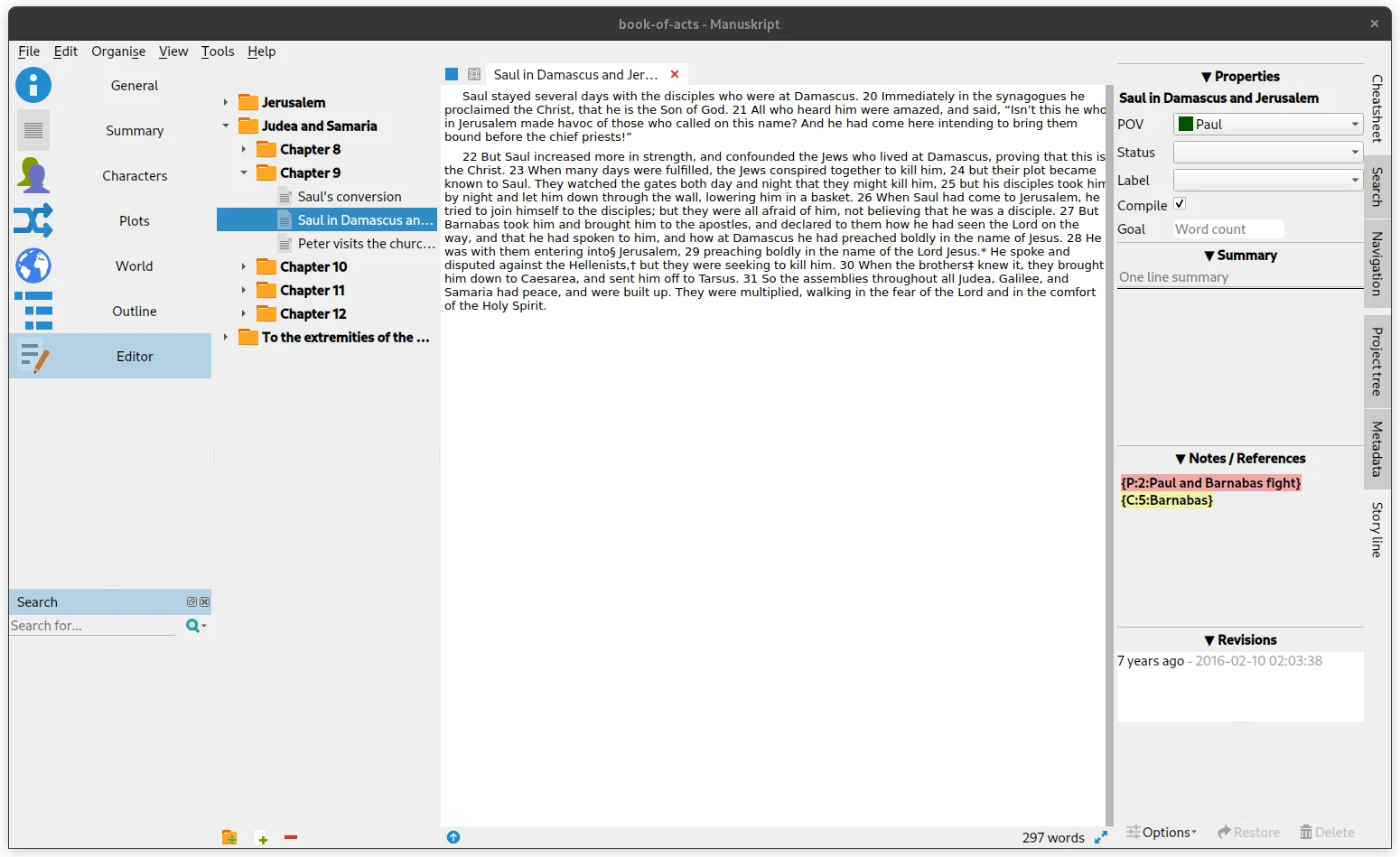
Yes: an assistant follows the Snowflake method, and plots are built on templates such as the three acts or the hero's journeyIf I name a character, even by a nickname, does the app find them?
Better answerExtypis
Yes, everywhere in the book, as soon as the nickname is on their sheet; a tab suggests the names in the text that have no sheet yetManuskript
No: you place a reference in curly braces yourself, like {C:5:Barnabas}, in the notes of each sceneCan I link my sheets and see a map of the relationships?
Better answerExtypis
Yes: you write what links two sheets, and a map shows the whole networkManuskript
No: a plot links to its characters, but there is no relationship between characters and no mapCan I place the events of the story on a timeline?
Better answerExtypis
Yes: each plotline has its own row, and each event is placed at its date in the story, as a single point or over a durationManuskript
No: six timeline requests have gone unanswered on GitHub since 2017Can several volumes share the same characters?
Extypis
Not with 1 project: a series requires the subscriptionManuskript
No: a project records its series and its volume number, but keeps its own characters
And AI?
Can I write with no AI at all?
Extypis
Yes: one setting removes every AI tool from the screen; only importing a manuscript still goes through an AIManuskript
Yes: it contains none; its spelling and grammar checker runs on your computerIf I want AI, do I get any?
Better answerExtypis
Yes: 300 credits, given onceManuskript
No: Manuskript contains none
Where and when can I write?
Can I write on the train, with no network?
Extypis
Only in a tab that is already open: the text waits for the network to come backBetter answerManuskript
Yes: it is installed software, and the project is a folder on your diskWhich languages is the interface in?
Extypis
In French, English, Spanish, German and ChineseManuskript
In 37 languages, translated by volunteers, including French, Spanish, German and Chinese, almost completely
How do I get, print and share my book?
Where do I write the dedication, the preface and the copyright page?
Better answerExtypis
On a computer, you write them on the pages of the book, in their place, and you type the publisher and the ISBN on the copyright pageManuskript
In scenes you create yourself: its General pane keeps the title, the author and the licence, with no copyright pageDo I get a PDF ready for the printer?
Better answerExtypis
Yes: Extypis typesets the PDF with LaTeX, in A4, A5 or Letter, up to 2 exports per monthManuskript
Yes, if you install Pandoc and LaTeX yourself; its wiki mentions neither a book format nor marginsCan I get an EPUB for an e-reader?
Extypis
Yes, up to 2 exports per monthBetter answerManuskript
Yes, with no limit, through Pandoc, installed separatelyCan I publish my book in the app, so people read it online and send comments?
Better answerExtypis
Yes: the book has its reading page, open to everyone, and readers with an account comment paragraph by paragraphManuskript
No: it is desktop software, and writing with several people has been on its roadmap since 2019Can I show that I wrote my text myself?
Better answerExtypis
Yes, for the typing: the “human origin” certificate says what was typed, pasted or moved, and is shared by a link; it does not say where the ideas come fromManuskript
No: it counts words and tracks your goals, without attesting anythingCan I bring in a manuscript started elsewhere?
Better answerExtypis
Yes: Word, PDF, EPUB, Markdown or HTML, as long as the manuscript fits in 15,000 wordsManuskript
In part: its wiki mentions Word, Markdown, HTML and EPUB, but marks their import “under development”
What its users like about Manuskript
A summary of what comes back in published reviews, each with its link. We paraphrase rather than quote.
It is a free, open-source Scrivener, with the same layout and real depth for planning; several reviews consider it the best free alternative, give or take a few features.
Projects are text files in Markdown: the writing stays readable outside the software, and the files stay light.
GitHub, discussion no. 5 · Reviews on AlternativeTo · Hacker News, January 2021
It runs natively on Linux, which made it the refuge of users when Scrivener dropped its Linux version.
OMG! Ubuntu, December 2016 · Hacker News, May 2026 · Reviews on AlternativeTo
It handles long multi-chapter novels: simple on the surface, rich in characters, plots and outline, say those who use it on Linux and Windows.
It tracks your goals in the project tree, with progress bars, and lets you choose the parts that go into the export.
What bothers its users, and how Extypis answers
The complaints that come back, from the most frequent to the rarest. Opposite each one, what Extypis does, including when it does no better.
The complaint
Windows Defender flagged version 0.17.0 as a Trojan, wrongly, and some people could not install it; a maintainer mentioned ending the Windows releases. The issue has 54 comments.
Extypis's answer
Extypis is not installed: it opens in the browser, on a secure address, and updates without downloading anything.
The complaint
There is no ready-to-use Mac app: since 2019, installing it has required Homebrew, Python and Terminal commands.
GitHub, issue no. 696 (Mac) · GitHub, issue no. 1191 (Mac) · Wiki: running Manuskript on Mac
Extypis's answer
Extypis opens in Safari, Chrome or Firefox on any Mac, and can be installed as an app from the browser if you wish.
The complaint
Bugs in the outline can destroy work: dragging an item up overwrites the content of another, a copy and paste creates duplicates, and copying a project from Linux to Windows duplicates entries.
GitHub, issue no. 719 (outline overwritten) · GitHub, issue no. 324 (duplicate IDs) · GitHub, issue no. 429 (copying between systems)
Extypis's answer
The text is saved continuously, each sheet keeps the versions you freeze, and Cmd+Z also undoes moving a scene or a chapter.
The complaint
Crashes and projects that no longer open, often linked to the graphical theme on Linux; its site warns that it is under development and advises saving often.
Reviews on AlternativeTo · GitHub, issue no. 935 (crashes) · Manuskript, download
Extypis's answer
The text is saved on our servers while you write, with a local copy in case of a dropout, and you export the whole project whenever you like.
The complaint
Getting started is rough and the documentation thin: users cannot tell the Plots and Outline tabs apart, and ask for a beginner's guide.
Extypis's answer
A guided tour shows the editor on first opening, and closes at any time. A new project opens on a scene ready to write.
The complaint
The interface is dated and dark mode depends on the system: on Fedora, Mint or Arch it stays light or half dark, and the Markdown symbols are displayed as they are.
GitHub, issue no. 388 (dark mode) · GitHub, issue no. 1414 (dark mode) · OMG! Ubuntu, December 2016
Extypis's answer
Extypis has a light mode and a dark mode, six theme colours, and formats the text as you type, with no stray symbol.
The complaint
Development is slow: 18 months between the last two versions, 589 open issues, and a creator who handed over the project in 2021 after being asked whether it was still alive.
GitHub, issue no. 830 (is the project still active?) · All versions and their downloads
Extypis's answer
Extypis is updated every week, and every visible new feature is announced on the what's new page. It is also a company, not a volunteer project: its code is not open.
What Manuskript does better
- It is free software and costs nothing, for good, with no limit on projects or length, and its code is open. The free Extypis account stops at 1 project and 15,000 words per project.
- Your projects are Markdown files on your disk, readable by any text editor, even if the software disappears.
- You can write entirely offline. Extypis keeps the text of a tab that is already open, but does not open offline.
- It exports to EPUB, Word or PDF with no limit, through Pandoc, and its interface exists in 37 languages.
- It runs natively on Linux.
What Extypis does that Manuskript does not
- It opens on a Mac, on a tablet and on a phone, with no installation, with the same text everywhere.
- You write in the pages of the book, at the size and margins of your PDF, and Extypis typesets that PDF without you installing Pandoc or LaTeX.
- It finds your characters, places and objects everywhere in the text, nicknames included, with no reference to place in curly braces.
- It links sheets with the relationship you write, draws the network on a map, and places events on a timeline of the story.
- It takes in a manuscript started in Word, in PDF or in EPUB, and splits it into chapters and scenes.
- It publishes your book on a reading page where your readers comment, and issues a “human origin” certificate that says what was typed, pasted or moved.
Moving from Manuskript to Extypis
Extypis does not open a Manuskript project as it is. In Manuskript, compile the novel to Word (DOCX, through Pandoc) or to Markdown, then import the file into Extypis: it is split into chapters and scenes, and the characters who come back often already have their sheet, filled with what the text says about them. Manuskript's sheets, plots and notes do not carry over by themselves: since they are text files, you copy them into the sheets. The free account imports a manuscript as long as it fits in 15,000 words; beyond that, importing requires a subscription.
The questions people ask us
- Is Manuskript free?
- Yes, entirely: it is free software under the GPL licence, with no account and no paid version. Donations are possible and unlock nothing (surveyed on 17 October 2026).
- Does Manuskript work on a Mac?
- Not simply: version 0.17.0 has no file for Mac, and the guide on its wiki asks you to install Homebrew, Python and PyQt5 through the Terminal. Contributors are preparing a Mac app, which is not yet published. Extypis opens in the browser of any Mac.
- Is Manuskript still being developed?
- Yes, slowly: the latest version, 0.17.0, dates from 30 June 2025, and the code was still changed on 1 September 2026. Its creator handed the project to a contributor in 2021, and 589 issues remain open.
- What is the difference with Extypis?
- Manuskript is free software for Windows and Linux, used offline, which keeps your projects as Markdown files. Extypis opens in the browser of all your devices, has you write in the pages of the book, finds your characters in the text and typesets the PDF; it is free up to 15,000 words per project, then costs 9 € per month.
- Does Manuskript have AI?
- No. Its only assistant follows the Snowflake method, and its spelling and grammar checker runs on your computer. Extypis offers AI on request, and one setting removes it from the screen.
- How do I move from Manuskript to Extypis?
- Compile your novel to Word or Markdown in Manuskript, then import the file into Extypis: it is split into chapters, and the characters who come back often already have their sheet. Sheets and plots are copied by hand. The free account imports a manuscript of at most 15,000 words.
Sources
The pages opened on 17 October 2026 to write each line about Manuskript.
- Manuskript, official site
- Manuskript, download
- Manuskript on GitHub
- Version 0.17.0 (30 June 2025)
- All versions and their downloads
- Wiki: Manuskript's panes
- Wiki: importing and exporting
- Wiki: running Manuskript on Mac
- Wiki: roadmap
- Interface translations
- Manuskript on Flathub
User reviews
- Reviews on AlternativeTo
- Hacker News, January 2021
- GitHub, discussion no. 5
- OMG! Ubuntu, December 2016
- Hacker News, May 2026
- Manuskript, official site
- GitHub, issue no. 1382 (Windows Defender)
- GitHub, issue no. 696 (Mac)
- GitHub, issue no. 1191 (Mac)
- Wiki: running Manuskript on Mac
- GitHub, issue no. 719 (outline overwritten)
- GitHub, issue no. 324 (duplicate IDs)
- GitHub, issue no. 429 (copying between systems)
- GitHub, issue no. 935 (crashes)
- Manuskript, download
- GitHub, issue no. 388 (dark mode)
- GitHub, issue no. 1414 (dark mode)
- GitHub, issue no. 830 (is the project still active?)
- All versions and their downloads
2026-10-17
See also Extypis compared to Scrivener · Extypis compared to bibisco · Extypis compared to yWriter · Extypis for writing a novel · The Extypis pricing grid
Extypis compared to other writing software
The same survey, tool by tool, with what each one does better.
 Extypis vs ScrivenerThe reference, installed and paid once
 Extypis vs Microsoft WordThe word processor publishers expect
 Extypis vs Google DocsGoogle's free word processor
 Extypis vs UlyssesThe Markdown app for Apple devices
 Extypis vs Reedsy StudioThe free online editor that typesets your book
 Extypis vs AtticusThe self-publishing formatting tool
 Extypis vs SudowriteWriting software built around AI
 Extypis vs yWriterFree for Windows, organised in scenes
 Extypis vs bibiscoFree, built around characters
 Extypis vs WriteControlThe French online writing app
The writing studio novelists were missing
Outline, characters, places and objects, the links between them, mind map, scene board, export: everything lives in one place. Plus an AI that knows your story, whenever you want one.
Free to write and to export. No credit card asked.
76 features. Just enough.
Ready to write?
Free signup, no credit card.
Everything our writing app puts in your hands
Five areas, from the first outline to the file ready to send: everything you ask of a writing app. Here is what each one covers.
Hold your story, from outline to final page.
Narrative tools you won't find elsewhere — turn a tangle of ideas into a structure that holds.
An AI that suggests, you decide
The AI permanently sees your whole project — outline, sheets, scenes already written. Every rewrite, every completion, every suggestion, every cover stays consistent with your entire work, and at no extra cost or setup. You approve every word.
Estimates if you only use this feature. Credits are shared across every AI tool.
Daily writing comfort
Everything that makes long-form writing sustainable: shortcuts, templates, anchored notes, versions, goals.
Analyse and refine your prose
Style tools that go beyond the spell-checker: readability, poetic meter, repetitions, connectors, passive voice.
What you write is what you export.
Your text is laid out as you type, in the format of your PDF. All that is left is to pick the file format, or to publish on Extypis.